# PI WEB
[](https://github.com/jmfederico/pi-web/actions/workflows/ci.yml)
[](https://www.npmjs.com/package/@jmfederico/pi-web)
[](package.json)
[](LICENSE)
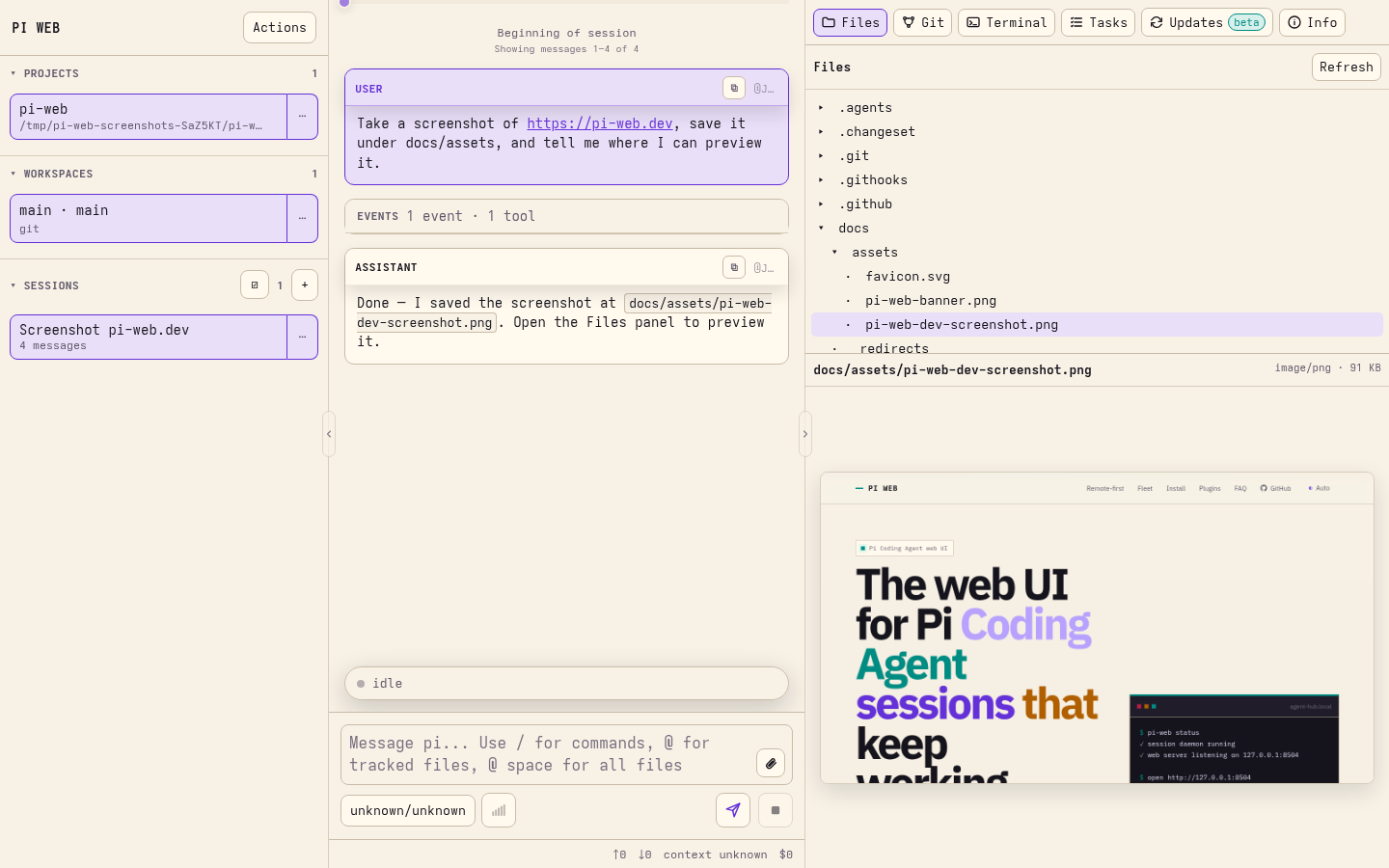
**PI WEB is a web UI for [Pi Coding Agent](https://github.com/earendil-works/pi/tree/main/packages/coding-agent) that keeps agent sessions running in real workspaces on your machine or server.**
Run agents where your code, tools, credentials, and build caches live. Supervise them from any browser.
Website and docs:

## Why PI WEB?
Agentic development works better when the work environment is persistent.
PI WEB lets you:
- keep Pi Coding Agent sessions alive after browser disconnects;
- run agents inside real repositories and git worktrees;
- supervise multiple sessions in parallel;
- switch between laptop, phone, tablet, and desktop;
- use a server, workstation, or remote dev box as your agent runtime;
- manage projects, workspaces, files, terminals, sessions, and remote machines from one web UI.
Your browser is the control surface. The work stays where it can keep running.
## Quick start
Requirements:
- Node.js 22 or newer
- npm
- Pi Coding Agent configured for your user
- git and the development tools your agents need
Install and start PI WEB as per-user services:
```bash
npm install -g @jmfederico/pi-web
pi-web install
pi-web doctor
```
Then open:
```text
http://127.0.0.1:8504
```
Useful commands:
```bash
pi-web status
pi-web logs
pi-web restart
pi-web doctor
pi-web version
pi-web uninstall
```
For more install options, including one-line install, Pi package install, WSL/manual usage, and remote access, see the [installation guide](https://pi-web.dev/install).
## Core model
PI WEB organizes work like this:
```text
Machine a local or remote PI WEB runtime endpoint
Project a folder on that machine
Workspace a git worktree, or the project folder for non-git projects
Session a Pi Coding Agent chat running inside a workspace
```
A typical flow:
1. Add a project.
2. Choose a workspace or git worktree.
3. Start a session.
4. Let the agent work.
5. Come back later from any browser.
## Remote-first development
PI WEB is designed for remote AI-driven development.
Instead of tying agent work to your laptop session, run PI WEB on a machine that stays available: a server, desktop, cloud VM, home lab machine, or remote dev box.
Use a private network, SSH tunnel, trusted reverse proxy, or federated PI WEB machine setup when accessing it remotely.
Read more: [Remote-first development](https://pi-web.dev/remote-first)
## Reverse proxy deployments
The published production client is deployment-independent. The same package works at the origin root (`/`) or at canonical nested prefixes such as `/ai/` and `/test/ai/`; do not rebuild or configure PI WEB for a particular prefix.
For a root deployment, proxy `/` directly to `http://127.0.0.1:8504` without rewriting the path. For a nested deployment:
1. Redirect the slashless prefix (`/ai`) to its trailing-slash form (`/ai/`). The browser uses that document URL as the application base.
2. Strip `/ai` before forwarding requests. PI WEB continues to serve `/`, `/api/...`, and `/pi-web-plugins/...` on its localhost listener.
3. Put authentication on the whole served `/ai/` application and preserve authentication headers/cookies when forwarding.
4. Proxy WebSocket upgrades through the same prefix. Do not create unprotected exceptions for API or plugin paths.
For example, this Nginx configuration belongs behind working TLS certificate directives:
```nginx
# http context
map $http_upgrade $connection_upgrade {
default upgrade;
'' close;
}
server {
listen 443 ssl;
server_name pi.example.com;
ssl_certificate /etc/letsencrypt/live/pi.example.com/fullchain.pem;
ssl_certificate_key /etc/letsencrypt/live/pi.example.com/privkey.pem;
auth_basic "PI WEB";
auth_basic_user_file /etc/nginx/pi-web.htpasswd;
location = /ai {
return 308 /ai/$is_args$args;
}
location ^~ /ai/ {
# The trailing slash strips /ai/ before forwarding.
proxy_pass http://127.0.0.1:8504/;
proxy_http_version 1.1;
proxy_set_header Host $host;
proxy_set_header X-Forwarded-Proto $scheme;
proxy_set_header X-Forwarded-For $proxy_add_x_forwarded_for;
proxy_set_header Authorization $http_authorization;
proxy_set_header Cookie $http_cookie;
proxy_set_header Upgrade $http_upgrade;
proxy_set_header Connection $connection_upgrade;
proxy_read_timeout 1h;
}
}
```
Use the same pattern for `/test/ai/` by changing both Nginx locations. If your proxy uses bearer tokens, SSO, or another authentication mechanism, keep that policy on the prefixed application location and continue forwarding the headers/cookies it requires; the slashless redirect serves no PI WEB content. Relative client, PWA, image, API, plugin, and WebSocket URLs then remain inside the deployment prefix; installed PWA `start_url` and scope do too.
## Machines and fleets
PI WEB can register other PI WEB runtimes as remote machines. One browser-facing PI WEB instance can proxy projects, files, git state, sessions, terminals, activity, Pi package management, and selected-machine settings from trusted remote machines.
When a remote machine is selected, Settings tabs label their target. Pi packages, PI WEB plugin enablement, session daemon toggles, external file access, and upload defaults target the selected machine. Gateway/server settings such as host, port, allowed hosts, registered machines/tokens, and keyboard shortcuts stay local to the gateway/browser.
Read more: [Fleet and machines guide](https://pi-web.dev/machines)
## Plugins
PI WEB supports trusted browser-side PI WEB plugins that can add actions, workspace panels, and workspace metadata.
Pi packages are managed separately through Pi's package manager or **Settings → Pi packages**. In a federated setup, the Pi packages panel targets the selected machine and labels where installs, updates, or removals will run. Use **Settings → PI WEB plugins** to enable or disable discovered browser plugins on the selected machine.
After installing, updating, or removing a Pi package, type `/reload` in each idle PI WEB session on that machine to refresh Pi runtime resources such as extensions, skills, prompt templates, themes, and context/system prompt files. Reload the browser page separately for newly discovered or changed PI WEB plugins.
Read more: [Plugin API](https://pi-web.dev/plugins)
## Configuration
Global config lives at:
```text
$PI_WEB_CONFIG
~/.config/pi-web/config.json
```
Project-local PI WEB config lives at:
```text
/.pi-web/config.json
```
Common configuration includes host/port, path access, uploads, PI WEB plugin enablement, shortcuts, and session daemon options. In Settings, machine-affecting config targets the selected machine; gateway host/port/allowed-hosts, remote machine registration, tokens, and keyboard shortcuts stay local.
Read more: [Configuration reference](https://pi-web.dev/config)
## Development
Clone the repository and run:
```bash
npm install
npm run dev
```
Open the Vite URL, usually:
```text
http://localhost:8505
```
For the split development setup:
```bash
npm run dev:sessiond
npm run dev:web
npm run dev:client
```
Validate changes with:
```bash
npm run verify
```
## Security model
PI WEB assumes trusted users, trusted repositories, and trusted server paths.
It is not a sandbox, permission system, or multi-tenant platform. Do not expose it directly to the public internet without a trusted network, firewall, VPN, SSH tunnel, or authenticated reverse proxy.
## Documentation
- [Website](https://pi-web.dev/)
- [Install](https://pi-web.dev/install)
- [Remote-first development](https://pi-web.dev/remote-first)
- [Machines / fleet](https://pi-web.dev/machines)
- [Configuration](https://pi-web.dev/config)
- [Plugins](https://pi-web.dev/plugins)
- [FAQ](https://pi-web.dev/faq)
## License
MIT © 2026 Federico Jaramillo Martinez. See [LICENSE](LICENSE).